Modding
FF is designed to be interoperable with other mods, and most importantly, to allow extension with additional content or integration of other creators’ content.
Using Workbench
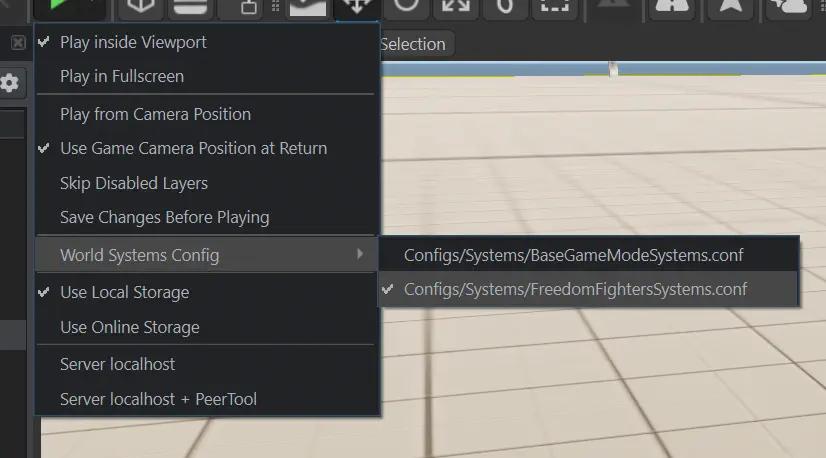
FF requires a custom world systems config to run. Every time you open a scenario in World Editor, you need to select the little arrow next to the play button -> World Systems Config -> check Configs/Systems/FreedomFighters.conf.
The full resource name of the config is: {43AAE7631D5693F6}FreedomFightersSystems.conf .
Skipping this step will result in an error message shown on the screen and the gamemode not launching.
Testing world
A test world is available at {691345602201052A}FF_TestWorld.ent . It can only be launched from Workbench and does not show up in the in-game scenario list.
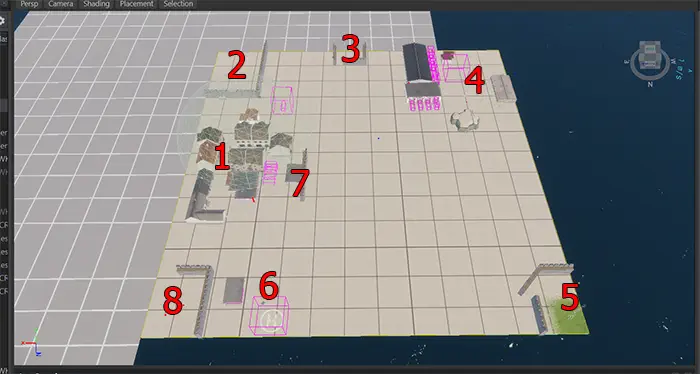
The testing world includes:
- Town.
- Area for testing FOB construction.
- Fuel station.
- Military base.
- Radio tower.
- Airport.
- Port.
- Military checkpoint.
Within the town there is a shop alley with shops’ interaction points for faster access. This includes all kinds of civilian shops available in-game, and also a special “everything” shop that includes all items recognized by FF (an arsenal box acts as an interaction point).