Prefab filters
You will stumble upon an attribute of type JWK_BaseResourceNameFilter in various configs, usually named “filters” or “imports”. This config is used to filter prefabs imported from the base game entity catalog and allows for great flexibility.
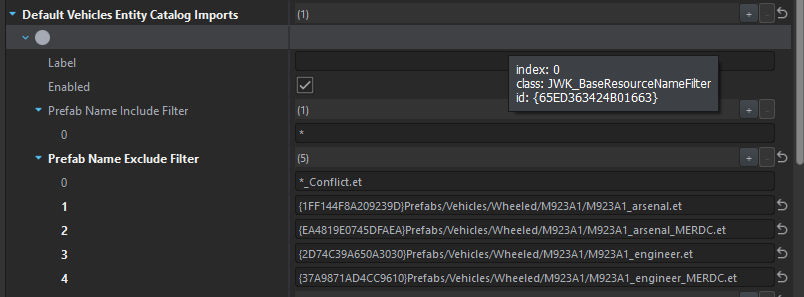
Label is only used to identify the entry within the editor and log files. Although labels are optional, they should be always used when working with an array of filters for easier identification. Each filter can be disabled, which will cause it to be ignored by the scripts.
The actual filter consists of an include and exclude list of patterns. Excludes have precedence, so if a prefab matches any of the excludes, it will be discarded. It needs to match at least one include pattern then to match the filter.'
Important
A rule with empty include list will never match any prefabs. If you want to create a “match all” rule, you can add a wildcard pattern with just an asterisk: *.
Tip
Usually you are able to specify a list of filters - if that is the case, a prefab is included if it matches any of the filters (logical OR), unless mentioned otherwise in the attribute hint.
Patterns
The pattern can be either in the form of a literal resource name, or a wildcard pattern. If the string starts with a GUID, it is assumed to be a literal resource name.
Example literal resource names are (all are valid):
{7CEF68E2BC68CE71}Prefabs/Items/Equipment/Compass/Compass_Adrianov.et{70BC751317551D9B}Canteen_Soviet_01.et{13772C903CB5E4F7}
Example wildcard patterns are:
*/Compass/Compass_*.et*Compass**
Literal resource names
Resource names are matched using their GUIDs and the remaining path is ignored, so a prefab named:
{7CEF68E2BC68CE71}Prefabs/Items/Equipment/Compass/Compass_Adrianov.et
will match with a literal:
{7CEF68E2BC68CE71}/I/just/made/this/path/up.et.
This makes sure that even if the prefab is modded, moved or renamed, it will continue to match. Literal resources are preferred over wildcard patterns, as they are more specific and reduce the possibility of unintended matches (i.e. when a third party mod adds new content that wasn’t taken into account).
Wildcard patterns
Wildcard patterns are matched against the full path of the prefab (excluding GUID) and may include ? and * as placeholders.
- question mark matches any single character
- asterisk matches 1 to many characters of any type
Examples:
- the pattern
*_Conflict.etwill match all prefabs files that end with_Conflictin the file name. - the pattern
*/Magazines/*will match all prefabs that are stored within aMagazinesdirectory (at any directory tree level) - the pattern
*/Magazines/*.etwill match all prefabs that are stored directly in aMagazinesdirectory - the pattern
*/???_Poster.etwill match all prefabs containing any 3 characters followed by_Posterin the file name
Wildcard patterns allow to quickly filter dozens of prefabs if they follow a specific naming convention.