Migrating old scenarios
Note
This page is work in progress.
This page is a quick reference for migrating scenarios that were created by replicating original FF scenarios, instead of following the scenario guide.
JWK_World entity
Create and place a world entity in your scenario as described here. This entity now groups attributes previously defined in various components on the game mode.
- Map offset, Map Size and Place name were previously defined on JWK_WorldSettingsComponent in JWK_GameMode entity
- Persistence Key was previously defined on JWK_PersistenceManagerComponent in JWK_GameMode
- Road Network Path was previously defined on JWK_RoadNetworkManagerComponent in JWK_GameMode
Once you place a JWK_World in your scenario, its values will have precedence over legacy attributes in JWK_GameMode. If any value is still loaded from legacy settings, you will see [DEPRECATED] entries in your log.
Custom buildings
All buildings in order to be usable by FF must have a JWK_SpawnPointsContainerComponent.
- In the legacy setup, this component contains a Points array attribute with a list of coordinates for the spawn points.
- In the new setup, this component is still required at the root entity, but the spawn points are defined as children entities.
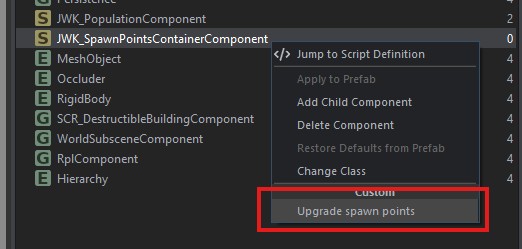
Existing setup can be quickly migrated by editing the prefab, right clicking on the JWK_SpawnPointsContainerComponent and selecting Upgrade spawn points. This will automatically clear the attribute and generate children entities.
Custom shops
Previous way to set up shops (general stores, clothing shops etc.) was to add JWK_ShopComponent and JWK_StaticMapIconComponent on the root entity (usually SCR_DestructibleBuildingEntity) of the composition.
Update all such prefabs by removing these components, and adding the appropriate controller prefab as a direct child of the root entity. You can refer to how vanilla buildings are configured in FF (i.e. ShopModern_E_01.et).
| Shop type | Controller prefab |
|---|---|
| General store | JWK_ShopController_CivGeneral.et |
| Clothing shop | JWK_ShopController_CivClothing.et |
| Medical shop | JWK_ShopController_CivMedical.et |
Ambient camera points
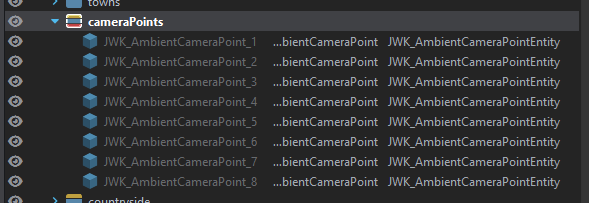
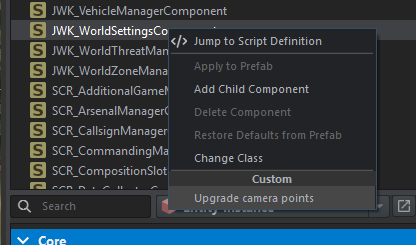
Create new layer called cameraPoints and activate it. Select game mode entity, right click on JWK_WorldSettingsComponent and select Upgrade camera points.
This will convert all entries from the Camera Positions attribute into entities automatically, as seen below.