Minimal setup
Custom FF prefabs
Locate FreedomFighters_Base.et and create an inherited prefab in your addon, naming it FreedomFighters_WorldName.et. Place that inherited prefab within your world.
Repeat the same process with JWK_World_Base.et.
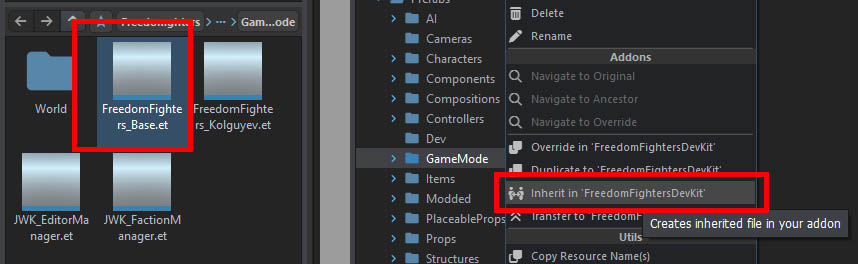
Do not use the base prefab directly, even if you do not wish to modify anything in it. Having a dedicated, intermediate prefab, allows you (or another mod creator) to modify game mode attributes without affecting other scenarios.
Note
Do not override any game mode entity attributes in the world file directly, as these attributes are final and it is not possible to change them in dependent mods.
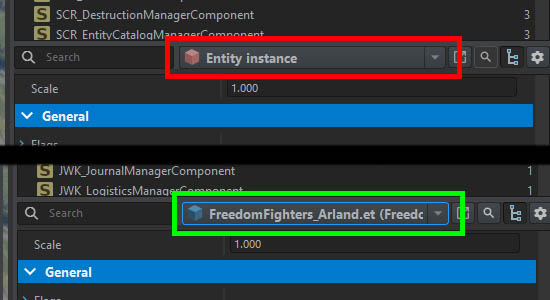
Always make sure you are modifying your prefab instance if you are changing anything on the game mode, as seen on the image below.
Other FF prefabs
Place JWK_FactionManager.et in the world as-is, without any modifications.
Standard prefabs
Other than things specific to FF, make sure to check existence and correct configuration of base game prefabs.
| Prefab name | Required | Description |
|---|---|---|
| SCR_AIWorld | Yes | Verify it’s using correct navmesh files, otherwise enemies will stand still, not react to players, or won’t be able to drive vehicles. Usually, the terrain creator provides a dedicated prefab. If not, use the default SCR_AIWorld.et. |
| SCR_MapEntity | Yes | Usually already included in the base world, or there should be a dedicated prefab. |
| ScriptedChatEntity | No | Without it you won’t be able to use development commands and players will not be able to log in as admins, and in turn launch the campaign. |
If any of the required entities is not found in the world, the game mode will not start. In that case check the log for details.
First test
With all the above, the core setup is done, and you should see the setup screen by entering the preview mode. While you could confirm the settings and launch a campaign, you will be stuck at the spawn selection screen, as there are no respawn locations available yet, so don’t do that yet.
Place JWK_TownController.et somewhere on land, enter preview mode and launch the campaign. You should be able to select your town for spawning in. Depending on where you put it, you may see a couple of warnings in the console, and the town will assume the name of the nearest town map marker. If there is none in range, it will be called Nowhere Town.
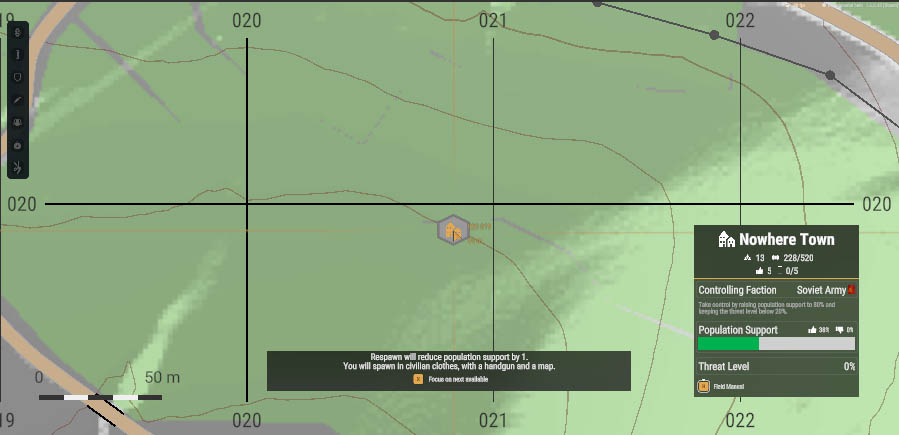
Congratulations! While your scenario is rather limited, it’s already functional. There should be some civilians nearby that you can convince to your cause, take control over the town and complete the mission.