Chat commands
Chat commands provide a backup way to access actions available normally via the actions panel in diag menu.
Info
Chat commands can be used on a live server if development mode is enabled.
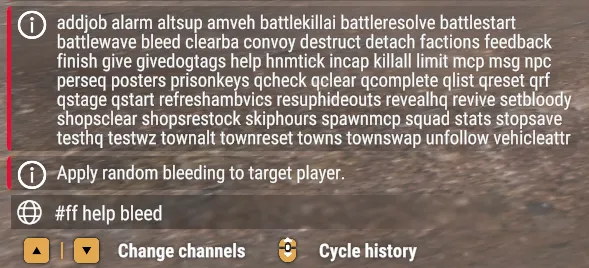
All commands have to be prefixed with #ff and most of them literally match the selectors in the Actions panel. You can type #ff help to list all available actions. This will print a detailed list in the log, as seen below.

Because the in-game chat limits length of the server response and has no scrolling capability, the help action only returns a list of action names. You can use #ff help <action name> to access the description.
Anything passed after the action name will be used as extra args, just like in the diag menu:
#ff givedogtags 5By default, the player invoking the command is the target player. A different player can be targeted by passing a --p flag at the end. The flag will be ignored if the action is not relevant to a player.
The example below adds 5 dogtags to the player whose ID is 2:
#ff givedogtags 5 --p=2Most action selectors in the actions panel literally match command names, but some are defined as aliases. For example, the +5 support is an alias for command #ff townalt sup 5. To see all aliases, refer to {84439CA0C982B7FE}Configs/Dev/DevUtils.conf.
Cheat sheet
| Command | Description |
|---|---|
#ff altsup 500 |
Add 500 supplies to nearest storage. |
#ff stopsave |
Immediately stop persisting game state. |
#ff resuphideouts |
Set all hideouts to 100% supplies. |
#ff townreset |
Reset nearest town support and threat modifiers. |
#ff battlestart |
Trigger battle for the nearest location. |
#ff battleresolve win |
Immediately win current battle. |
#ff battleresolve lose |
Immediately lose current battle. |
#ff revealhq |
Reveal HQ location on the map. |
#ff addjob [name] |
Assign new job using given job name, or skip the name to pick randomly. |
#ff give [name] |
Insert item into player inventory. If name is skipped, the command will print available options. See DevAliases_Items.conf to add custom ones. |
Dumping information
The following commands can be used to dump information to the log file, which is useful to verify issues like “is my custom item correctly assigned to the enemy faction”.
#ff vehattr |
Dump all vehicle attributes to log. |
#ff factions |
Dump configurations of factions used by current campaign. |