Item attributes
Important
For an item to appear in the world, it has to be added to the relevant faction entity catalog. Setting up attributes is optional, but highly preferred. See faction addons for how to override entity catalog assignments.
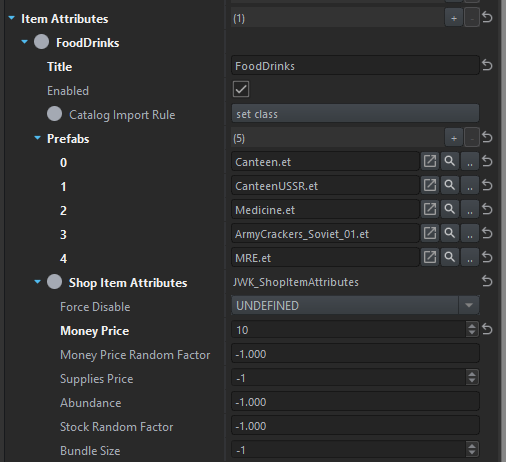
Item attributes are very similar to vehicle attributes. They are also applied on a per-prefab basis and allow to bind various properties. The Catalog Import Rule is not yet implemented and has no effect.
The attributes are appended one after another to matching prefabs, with the latter attributes overriding earlier ones.
By default, all prices are randomized a little to be more realistic. You can set Money Price Random Factor to 0 to disable this.
If Supplies Price is not set, FF will try to retrieve it from the base game arsenal configuration. Often times this is already configured in the original mod and set to a meaningful value.
Info
Attributes defined here are not final and can be further overriden in the shop configuration or by scripts, thus the outcome prices or stocks you see in-game may differ. The values here are always used as the basis.
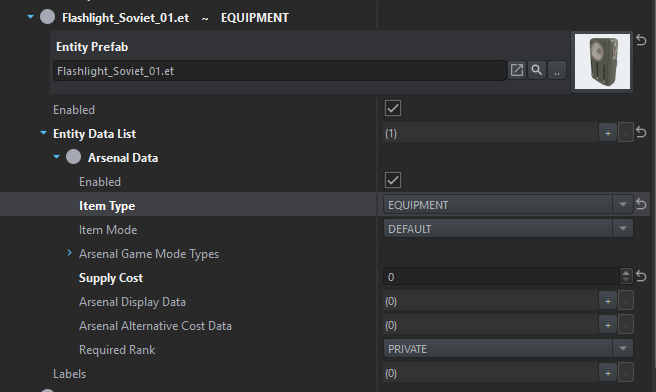
Note that certain shops filter available items based on their arsenal data (particularly Item Type), which is configured in the base game entity catalog, as seen below. If your item does not appear in the shop, even though you have configured FF attributes and included it in the faction addons, check for existence of the arsenal data.